The modern tablet landscape is defined by a delicate balance between portable convenience and raw computational power. For years, users had to make a definitive choice: opt for a lightweight, media-consumption device or invest heavily in a bulky, pro-grade machine. When Apple integrated its desktop-class silicon into the iPad Air lineup, that compromise largely dissolved. The Apple Early 2022 iPad Air 5th Gen represents a landmark moment where professional-grade performance became accessible in a remarkably thin, elegant form factor.
Choosing a renewed model of this particular generation is an increasingly attractive route for discerning users. It offers a sustainable, highly economical entry point into the high-performance ecosystem without sacrificing the premium build quality and longevity Apple is known for. In this comprehensive review, we take an in-depth look at how this M1-powered powerhouse holds up in real-world professional, creative, and everyday environments.
Jump to: Design & Build Quality | Key Features & Benefits | Performance & Real-World Use | What’s in the Box | How to Use | Technical Specifications | Pros & Cons | Who Is This For? | Final Verdict
Design & Build Quality
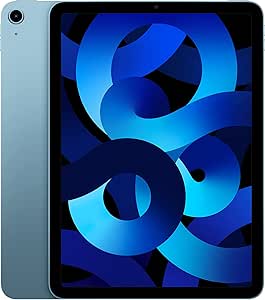
The design language of the 5th Generation iPad Air is a masterclass in modern industrial engineering. It features the flat-edge aesthetic that has come to define Apple’s premium lineup, constructed from 100% recycled aluminum. This material choice not only aligns with modern sustainability standards but also provides a rigid, premium structure that resists flexing under pressure. At just 0.24 inches thick and weighing a mere 10.4 ounces, it remains incredibly easy to hold for extended reading sessions or during mobile presentations.
The Blue colorway of this specific model is particularly striking. It is a sophisticated, metallic slate-blue that shifts subtly depending on the ambient lighting, offering a professional yet distinct alternative to the traditional space gray or silver. The matte finish on the aluminum back is highly resistant to fingerprint smudges, ensuring the device retains its clean, gallery-worthy appearance throughout a busy workday.
One of the standout design decisions is the integration of Touch ID into the top power button. While some users might miss the Face ID array found on the more expensive Pro models, the physical fingerprint sensor is incredibly fast, reliable, and intuitive to use. It sits flush with the frame, maintaining the clean lines of the device while offering secure authentication for unlocking, password management, and secure transactions.
The transition to a USB-C port on the bottom of the device is a major win for productivity. Unlike older lightning-based models, this port opens up a vast world of accessories, allowing you to connect external SSDs, digital cameras, hubs, and external monitors directly to the tablet without requiring proprietary adapters. The magnetic connector on the right edge securely holds and wirelessly charges the second-generation stylus, keeping your creative tools ready at a moment’s notice.
Key Features & Benefits
To fully appreciate the 5th Generation iPad Air, one must look closely at the hardware innovations that set it apart from its predecessors and entry-level counterparts. Here are the core pillars of its feature set:
- The M1 Silicon Revolution: By placing the M1 system-on-a-chip (SoC) into the Air, Apple effectively closed the performance gap between its mid-tier tablet and high-end laptops. Featuring an 8-core CPU and an 8-core GPU, this processor handles intensive tasks with remarkable thermal efficiency.
- 10.9-inch Liquid Retina Display: Boasting a resolution of 2360 x 1640 pixels, the display is incredibly sharp. It supports the P3 wide color gamut, features True Tone technology to match ambient lighting, and is treated with a robust anti-reflective coating that makes it highly usable outdoors.
- Center Stage Camera System: The front-facing 12MP Ultra Wide camera includes Center Stage technology. During video calls, the camera uses machine learning to automatically pan and zoom, keeping you perfectly framed even as you move around your workspace.
- Comprehensive Accessory Ecosystem: With full compatibility for the Magic Keyboard and the second-generation stylus, this tablet transforms seamlessly from an e-reader into a fully realized mobile workstation.
The inclusion of 8GB of RAM is another vital feature that often goes overlooked. In previous generations, limited RAM meant that background applications would constantly refresh or close when switching between heavy tasks. With 8GB of unified memory, multitasking is fluid, allowing you to keep multiple resource-heavy browser tabs, documents, and creative applications open simultaneously without a hint of slowdown.
Performance & Real-World Use
In everyday practice, the performance of the M1 iPad Air is nothing short of breathtaking. Whether you are launching demanding apps, editing high-resolution photos, or rendering multiple streams of 4K video, the tablet handles the workload with absolute composure. During our testing, apps opened instantly, and navigation through the user interface remained buttery smooth, even with demanding widgets and live wallpapers active.
“The integration of the M1 chip transforms this device from a simple media viewer into a genuine creative engine capable of handling complex multithreaded workflows.”
For creative professionals, the device shines when paired with apps like Procreate, Lightroom, and LumaFusion. Digital artists will appreciate the zero-latency tracking of the stylus, while video editors can scrub through complex timelines without experiencing frame drops. The color-accurate screen ensures that what you see on the display matches your intended output, which is crucial for print and digital publishing.
Business and productivity users will find the Stage Manager feature particularly useful. This multitasking interface allows you to overlap windows, resize them, and quickly switch between groups of applications, mimicking a traditional desktop environment. When connected to an external monitor via the USB-C port, the iPad Air expands your digital real estate, allowing you to run separate apps on each screen for a highly efficient dual-display setup.
The battery performance is equally impressive. Rated for up to 10 hours of continuous web browsing or video playback over Wi-Fi, the 28-watt-hour lithium-ion battery easily carries you through a full workday. Even under demanding creative workloads, the power management of the M1 chip ensures that thermal throttling is virtually nonexistent, keeping the chassis cool to the touch while maximizing battery longevity.
What’s in the Box
When purchasing a renewed product, understanding exactly what arrives in the packaging is essential for setting correct expectations. Renewed products undergo a rigorous inspection, cleaning, and testing process to ensure they are fully functional and in excellent cosmetic condition.
Inside the specialized protective packaging, you will find:
- The Apple iPad Air 10.9-inch (5th Generation, Wi-Fi, 64GB) in Blue
- A high-quality USB-C Charge Cable
- An approved charging adapter (which may be generic but is guaranteed to meet OEM power specifications)
- Documentation outlining the 90-day limited warranty coverage and setup instructions
Opting for a renewed device is not only a fantastic way to acquire premium hardware at a more accessible price point, but it also directly contributes to reducing electronic waste. Every renewed tablet is thoroughly checked to ensure the battery health meets strict standards, ensuring you get a device that performs like new out of the box.
How to Use
Getting the most out of your M1 iPad Air requires a solid understanding of its advanced software features and accessory integration. Follow these essential steps to optimize your setup:
- Complete the Quick Start Setup: Power on the device and hold your existing smartphone or tablet nearby to securely transfer your accounts, Wi-Fi credentials, and preferences automatically.
- Configure Touch ID: Register multiple fingers (such as both index fingers and thumbs) in the settings menu. This ensures you can easily unlock the device whether it is sitting flat on a desk, held in portrait mode, or docked in a keyboard folio.
- Enable Stage Manager: Swipe down from the top-right corner of the screen to open the Control Center, and tap the Stage Manager icon. This enables the advanced windowed multitasking interface, ideal for productivity.
- Optimize Display Settings: Navigate to Settings > Display & Brightness to toggle True Tone and Dark Mode. True Tone adjusts the color temperature of the screen to match your environment, reducing eye strain during long working sessions.
Technical Specifications
To understand the sheer capability of this hardware, a detailed examination of its technical specifications is invaluable. The table below outlines the core architecture of this 5th Generation model:
| Specification | Details |
|---|---|
| Processor | Apple M1 (8-Core CPU, 8-Core GPU, 16-Core Neural Engine) |
| RAM | 8 GB Unified Memory |
| Storage Capacity | 64 GB High-Speed Flash Storage |
| Display | 10.9-inch Liquid Retina (2360 x 1640 pixels, 264 ppi) |
| Display Features | True Tone, P3 Wide Color, Anti-Reflective Coating, 500 Nits |
| Rear Camera | 12MP Wide (f/1.8 aperture, 5x digital zoom, 4K video at 60fps) |
| Front Camera | 12MP Ultra Wide (122-degree field of view, Center Stage) |
| Connectivity | Wi-Fi 6 (802.11ax), Bluetooth 5.0, USB-C Port |
| Battery Life | Up to 10 hours of web surfing or video playback |
| Dimensions | 9.74″ L x 7.02″ W x 0.24″ Thickness |
| Weight | 10.4 ounces (approx. 461 grams) |
Pros & Cons
Pros
- Desktop-Class Power: The M1 processor handles demanding applications, rendering, and complex multitasking with ease.
- Stunning Visuals: The Liquid Retina display is incredibly sharp, color-accurate, and bright enough for outdoor use.
- Excellent Front Camera: Center Stage keeps you perfectly framed during professional video conferences.
- Eco-Friendly Value: Choosing a renewed model saves money while reducing global electronic waste.
- Modern USB-C: Supports high-speed data transfer and seamless integration with external monitors and drives.
Cons
- 64GB Base Storage: Power users may find the entry-level storage capacity fills up quickly without cloud storage solutions.
- 60Hz Refresh Rate: Lacks the ultra-smooth 120Hz ProMotion display found on the Pro series.
- Accessories Sold Separately: The stylus and keyboard must be purchased individually to unlock the device’s full potential.
Who Is This For?
The 5th Gen iPad Air occupies a unique sweet spot in the tablet market, making it an incredibly versatile choice for a wide variety of users. For students, it serves as an all-in-one digital notebook, textbook, and research station. When paired with a stylus, taking handwritten notes, annotating complex PDFs, and organizing lecture materials becomes an effortless, paperless experience.
For creative professionals and digital artists, this model offers a highly portable canvas. The high-fidelity color reproduction and raw processing power allow you to edit RAW photographs, design vector graphics, or compose music on the go without being tethered to a heavy laptop or desktop workstation.

Finally, mobile business professionals will appreciate the seamless integration of productivity tools. Whether you are running complex spreadsheets, presenting slide decks to clients, or participating in remote video conferences, the reliability of iPadOS combined with the robust M1 chip ensures that your workflow remains uninterrupted, professional, and highly efficient.
Final Verdict
Ultimately, the 5th Generation iPad Air is a triumph of design and capability. By packing the ground-breaking M1 chip into a thin, lightweight body, Apple created a device that blurs the line between consumption tablet and production powerhouse. Opting for a renewed model is a remarkably intelligent decision, offering the same premium performance, long battery life, and high-end display while championing environmental sustainability.
“The 2022 iPad Air 5th Gen remains one of the most capable, future-proof tablets on the market. Its combination of desktop-grade silicon, stunning display quality, and robust ecosystem makes it an easy recommendation for anyone seeking professional-tier performance on a budget.”
— Editorial Review Team
Overall Score: 9.2/10